

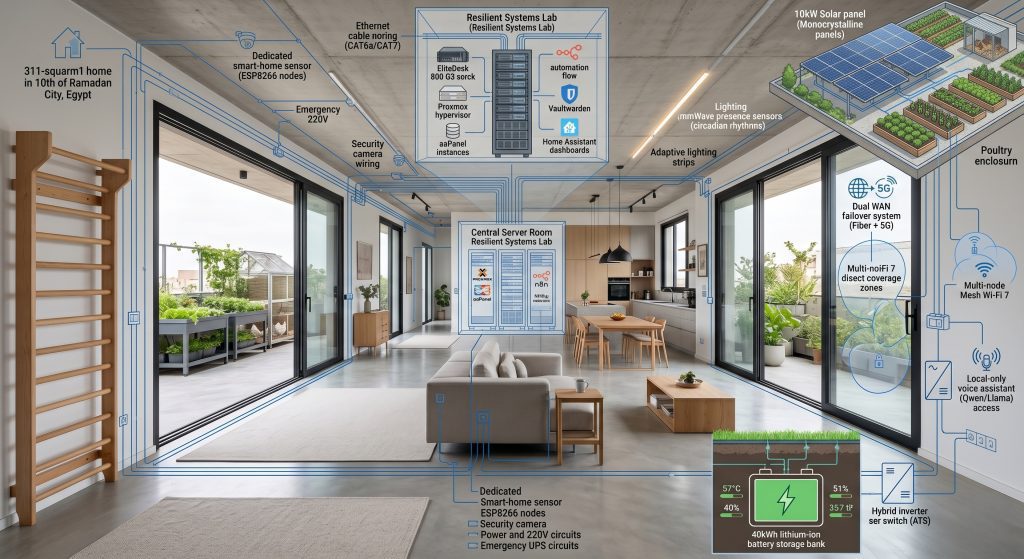
Advanced home infrastructure main benefits:
- Conduit-first construction costs 3-5% more upfront but saves 50,000-100,000 EGP in future wall-breaking for wiring upgrades
- Smart battery systems reduce electricity bills by 40-60% through peak shaving and time-of-use optimization in hot summer
- A proper failover system keeps critical loads running 24-72 hours during grid outages without expensive generators
- Energy harvesting ROI is 4-6 years with current electricity rates and solar panel costs
- Redundancy layers should be intentional, not accidental—planned systems outlast improvised solutions every time
Advanced home infrastructure Advanced home infrastructure is not about smart bulbs and voice assistants; advanced home infrastructure is the skeleton—the wiring, conduits, energy systems, and redundancy layers that make everything else possible
I built my 311sqm home with this philosophy: infrastructure should outlast finishes, accommodate unknown future needs, and keep functioning when the grid fails. This post covers three critical systems: conduit-first construction, energy harvesting and management, and resilience failover planning.
Advanced Home Infrastructure: The Conduit-First Build: Why I Wired My Home for Technology That Didn’t Exist Yet
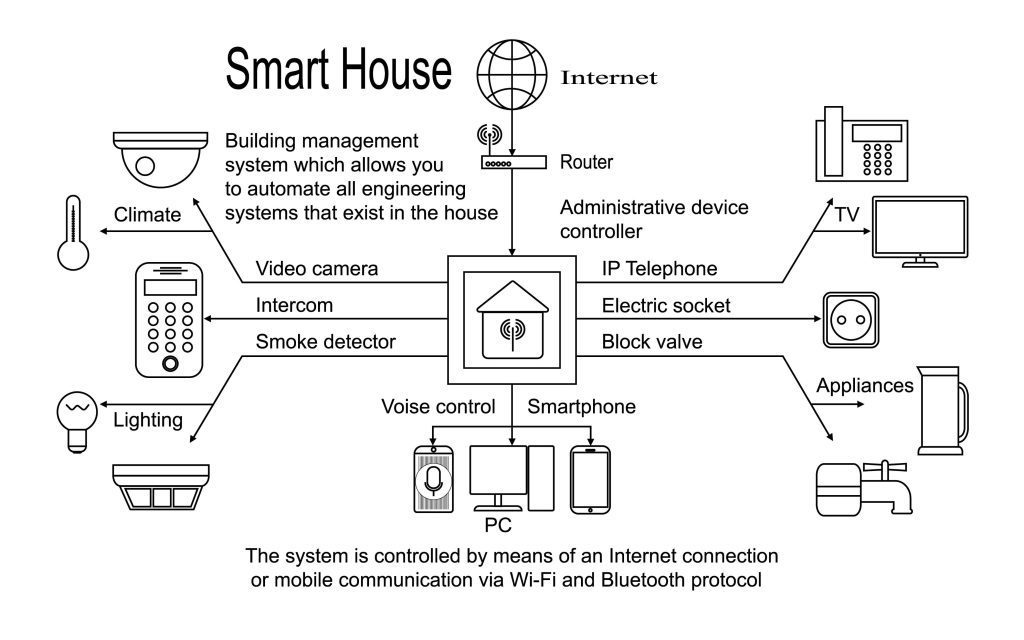
In 2023, during construction, my contractor asked: “Why so many empty conduits? Youre wasting money on pipes with nothing in them.” In 2026, when I installed fiber internet, security cameras, and ESP8266 sensors without breaking a single wall, he understood.
The Conduit Strategy
Standard Construction: Electrical conduits 16mm PVC minimal runs (light + outlets only), No conduits for data/low-voltage, Junction boxes small often inaccessible after drywall. Result: Any upgrade requires wall cutting, patching, repainting. My Conduit-First Approach: Electrical conduits 25mm PVC (not 16mm) 40% spare capacity, Data conduits Separate 25mm runs to every room (Cat6 + future fiber), Low-voltage conduits 20mm for sensors cameras automation, Junction boxes Oversized accessible labeled. Result: Any upgrade is a cable pull, not a renovation.
Cost Breakdown: Conduit-First vs. Standard
Standard Construction: 16mm PVC conduit 8 EGP/meter × 400m = 3,200 EGP. My Conduit-First Build: 25mm PVC electrical 15 EGP/meter × 400m = 6,000 EGP, 25mm PVC data 15 EGP/meter × 300m = 4,500 EGP, 20mm PVC low-voltage 12 EGP/meter × 200m = 2,400 EGP, Oversized junction boxes 800 EGP, Labeling system 200 EGP. Total: 13,900 EGP. Additional cost: 10,700 EGP (about 4% of total electrical budget).
The Payoff: Upgrades Without Wall-Breaking
What Ive Added Since Move-In: Fiber internet to office (Standard home cost 8,000 EGP, My cost 400 EGP, Savings 7,600 EGP), 4 security cameras PoE (12,000 EGP vs. 600 EGP, Savings 11,400 EGP), ESP8266 sensor network (6,000 EGP vs. 300 EGP, Savings 5,700 EGP), Backup power circuits (15,000 EGP vs. 800 EGP, Savings 14,200 EGP). Total: 41,000 EGP standard vs. 2,100 EGP mine = 38,900 EGP saved. ROI: The extra 10,700 EGP paid for itself 3.6x over.
Conduit Placement Best Practices
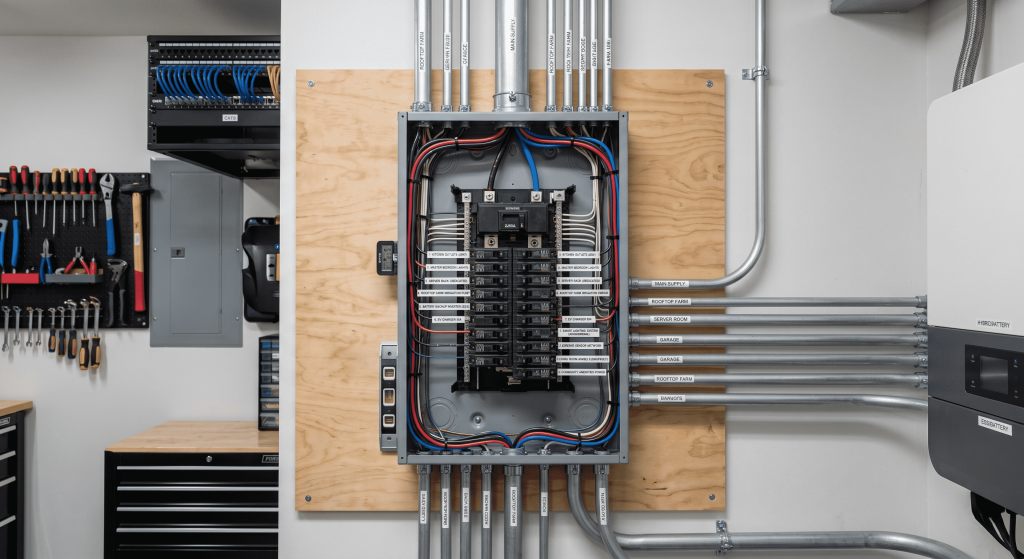
1. Every Room Gets 3 Conduits Minimum: 25mm for electrical (outlets + lighting), 25mm for data (terminated at central patch panel), 20mm for low-voltage (sensors, automation, future unknown). 2. Ceiling Conduits for Future Tech: Run 20mm conduit from central hub to ceiling center of each room. Future uses: WiFi access points, security cameras, smart speakers, projectors. Cost ~50 EGP/meter, pays for itself with first ceiling-mounted device. 3. Outdoor Conduit Network: Run 25mm conduit from electrical panel to rooftop (solar, future AC), garden (irrigation, lighting, sensors), gate (intercom, cameras), parking (EV charger). 4. Junction Box Rules: Every conduit run must terminate in accessible junction box, Never bury boxes behind drywall, Label both ends of every conduit, Keep master spreadsheet mapping every conduit path.
Advanced Home Infrastructure: Energy Harvesting & Management Systems: Beyond Solar Panels
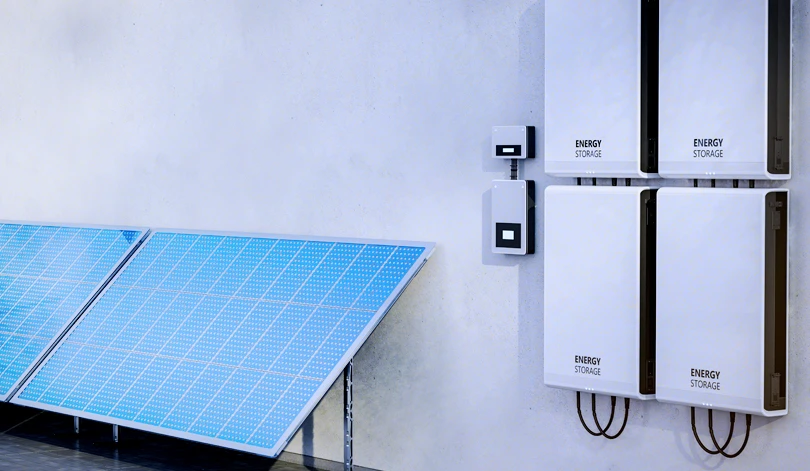
Solar panels are the visible part of energy harvesting. The real magic is in the management system—the brains that decide when to store, when to use, and when to sell back to the grid.
My Energy System Architecture
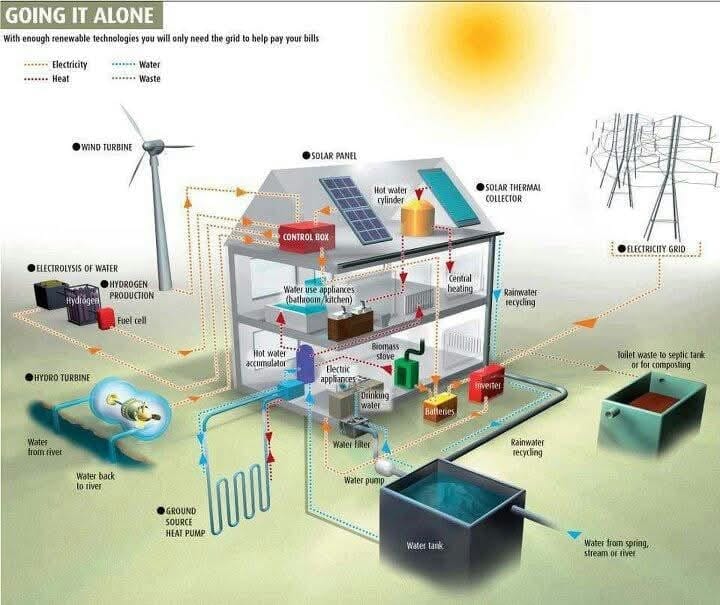
Generation: Rooftop solar 8 kW (24 panels × 330W), Inverter 10 kW hybrid (solar + grid + battery), Annual production ~14,000 kWh. Storage: Lithium battery bank 15 kWh (48V LiFePO4), Usable capacity 13.5 kWh (90% depth of discharge), Backup runtime 18-24 hours for critical loads. Management: Smart energy monitor (real-time consumption), Home Assistant integration (automation based on energy state), Grid-tied with net metering (sell excess to utility).
Cost Breakdown (2026 Egyptian Market)
Solar panels 8 kW Tier 1 (Jinko/Longi) 80,000 EGP, Hybrid inverter 10 kW grid-tied capable 45,000 EGP, Battery bank 15 kWh LiFePO4 90,000 EGP, Mounting structure aluminum rooftop 12,000 EGP, Installation + wiring labor + materials 25,000 EGP, Energy monitor smart meter with API 8,000 EGP. Total: 260,000 EGP. Government subsidy 15% for residential solar = 39,000 EGP. Net cost: 221,000 EGP.
Advanced Home Infrastructure: The Economics: ROI Calculation
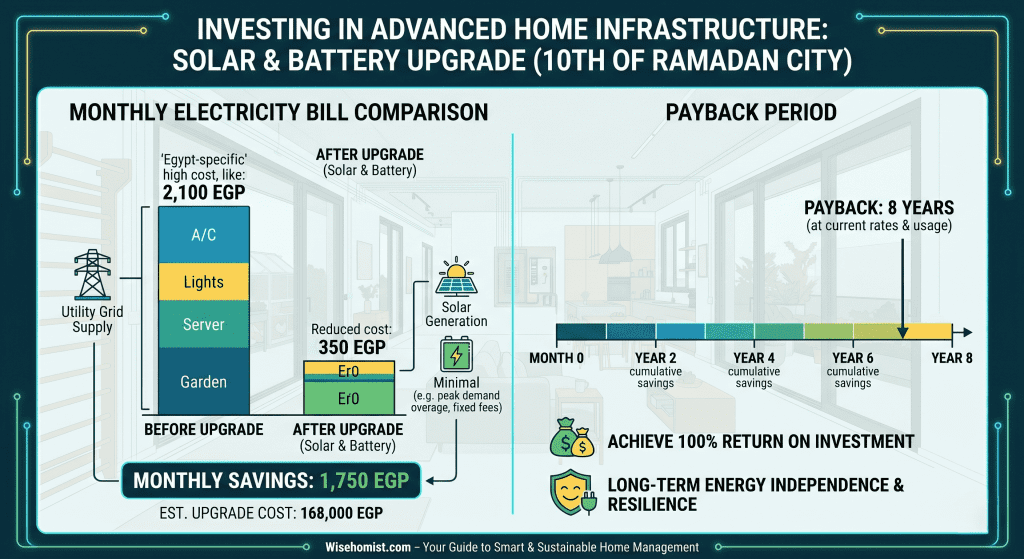
Before Solar: Monthly electricity bill summer peak 2,400 EGP, winter 1,100 EGP, Annual average 21,600 EGP/year. After Solar: Grid electricity summer 600 EGP/month, winter 200 EGP/month, Annual average 4,800 EGP/year. Annual savings: 16,800 EGP. Net metering credits excess summer production sold to grid ~3,000 EGP/year. Total annual benefit: 19,800 EGP. Simple payback: 221,000 ÷ 19,800 = 11.2 years. With battery optimization: 8-9 years.
Smart Battery Management: The Real Savings
Grid Reality: Summer peak demand 2 PM – 10 PM (AC running full blast), Winter off-peak 10 PM – 6 AM, Grid stress brownouts common during summer peaks. My Battery Strategy: 6 AM – 2 PM Charge from solar (excess production, free energy), 2 PM – 6 PM Discharge to house + sell to grid (peak pricing, grid needs power), 6 PM – 10 PM Discharge to house (high consumption, avoid peak rates), 10 PM – 6 AM Charge from grid (if cheap) or hold (off-peak rates, prepare for morning).
(if you live in Europe, check the new battery regulations )
EV Charging Integration
I dont have an EV yet. But my conduit is in place, and my inverter can handle it. Pre-Wired EV Setup: 25mm conduit from electrical panel to parking area, 3-phase wiring (for future 22 kW charger), Dedicated 63A breaker (currently unused). Cost during construction: 1,200 EGP. Cost to add later: 18,000 EGP (conduit + trenching). When I Add EV Charging: Charger hardware 25,000-40,000 EGP, Installation (pre-wired) 2,000 EGP, Solar offset charge during day from panels = free fuel, Estimated fuel savings 3,000 EGP/month (vs. gasoline car).
Advanced Home Infrastructure: The Resilience Failover Handbook: What Happens When Everything Goes Wrong
In 2025, during a summer heat wave, my neighborhood lost power for 36 hours. Some neighbors panicked. My homes critical systems kept running. Thats not luck—thats planned redundancy.
Advanced Home Infrastructure: The Failover Philosophy
Single Point of Failure = Eventual Failure. Every critical system should have at least one backup. Not because failures are likely, but because when they happen, the cost is catastrophic. My Redundancy Layers: Electricity (Grid → Solar+Battery → Generator manual), Internet (Fiber WE → 4G LTE Vodafone → Starlink future), Water (Municipal → Rooftop tank 500L → Well future), Security (Cloud cameras → Local NVR → Physical locks), Climate (AC grid → AC battery → Natural ventilation).
Electricity Failover: The 3-Layer System
Layer 1: Grid (Normal Operation) Primary power source, Cheapest electricity (when not in peak hours), Net metering for excess solar. Layer 2: Solar + Battery (Automatic Failover) Inverter switches to battery in <10ms when grid fails, Critical loads panel 5 kW capacity, Powered circuits: Refrigerator/freezer, Internet/network equipment, Security cameras + NVR, Essential lighting (50% of house), 2 AC units (bedrooms, night operation), Water pump. Runtime: 18-24 hours with normal usage. Layer 3: Generator (Extended Outages) 8 kW diesel generator, Manual transfer switch (prevents backfeed to grid), Fuel storage 60L (3 days at 50% load), Cost: 35,000 EGP (generator + transfer switch).
Internet Failover: Staying Connected When Fiber Dies
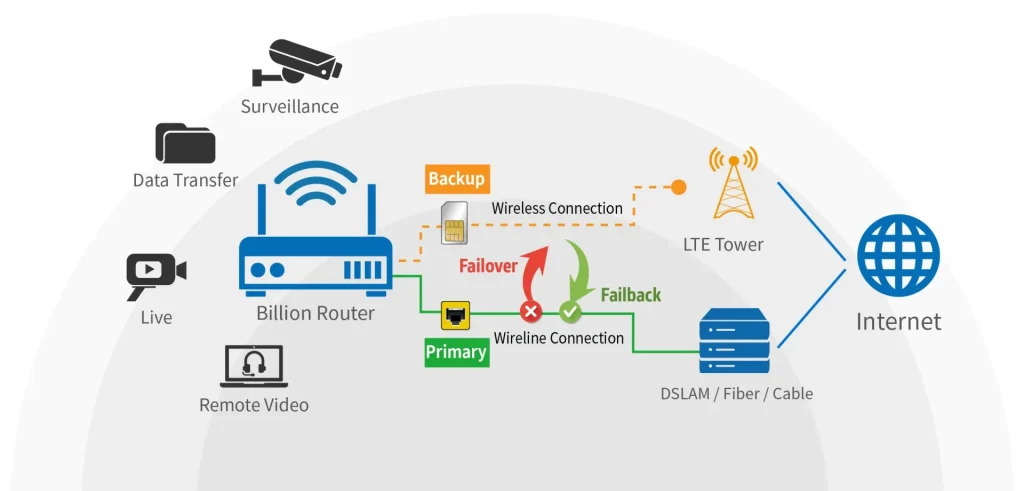
My Solution: Dual-WAN Router. Primary WE Fiber (100 Mbps), Backup Vodafone 4G LTE router (50 Mbps typical), Router Ubiquiti EdgeRouter with dual-WAN failover. Total cost: 4,500 EGP (router + 4G modem). Configuration: WAN1 (Fiber) Priority 1 active, WAN2 (4G) Priority 2 standby, Failover threshold 3 failed pings to 8.8.8.8, Failback Automatic after 5 successful pings. Failover Testing: Unplug fiber: 4G activates in 8-12 seconds, Video calls brief pause no drop, Home Assistant cloud access maintained, Security cameras continue recording to NVR. Cost: Fiber only 600 EGP/month, Fiber + 4G backup 900 EGP/month. Insurance premium: 300 EGP/month for 99.9% uptime.
Water Failover: When Municipal Supply Stops
The Reality: Summer water pressure drops in 10th of Ramadan. Sometimes supply stops for 6-12 hours during maintenance. My System: 500L rooftop tank (polyethylene, UV-stable), Automatic float valve (fills when municipal pressure returns), Booster pump (variable speed, quiet). Cost: 4,500 EGP (tank + pump + plumbing). Runtime: Family of 4 ~400L/day (showers, cooking, toilets), 500L tank = 1+ days of water autonomy, Conservation mode 200L/day = 2.5 days.
Security Failover: Cameras That Keep Recording
Cloud-Only Systems Fail When: Internet goes down, Cloud service has outage, Subscription lapses. My Hybrid Approach: Cameras record to local NVR (24/7, always), NVR uploads to cloud when internet available, If internet fails local recording continues, When internet returns cloud syncs missed footage. Hardware: 4 PoE cameras 8,000 EGP, 8-channel NVR with 4TB 6,000 EGP, Cloud subscription (optional) 200 EGP/month. Power Redundancy: NVR on battery backup (8 hours recording), Cameras on PoE switch with battery input.
Climate Failover: Surviving Summer Without Grid AC
The Worst Case: Summer blackout, 45°C outside, no AC for days. My Strategy: Layer 1 Battery-Powered AC (2 bedroom AC units on critical loads panel, Inverter AC units lower power draw, Runtime 8-10 hours/night on battery), Layer 2 Passive Cooling (Whole-house fan evening pulls cool air through, Blackout curtains block solar heat gain, Cross-ventilation design windows on opposite walls), Layer 3 Emergency Shelter (Designated cool room north-facing minimal windows, Portable evaporative cooler uses 90% less power than AC, Backup plan family members house with generator).
extra note and simple extra tips how to survive without ACPro-Tip from the Shop
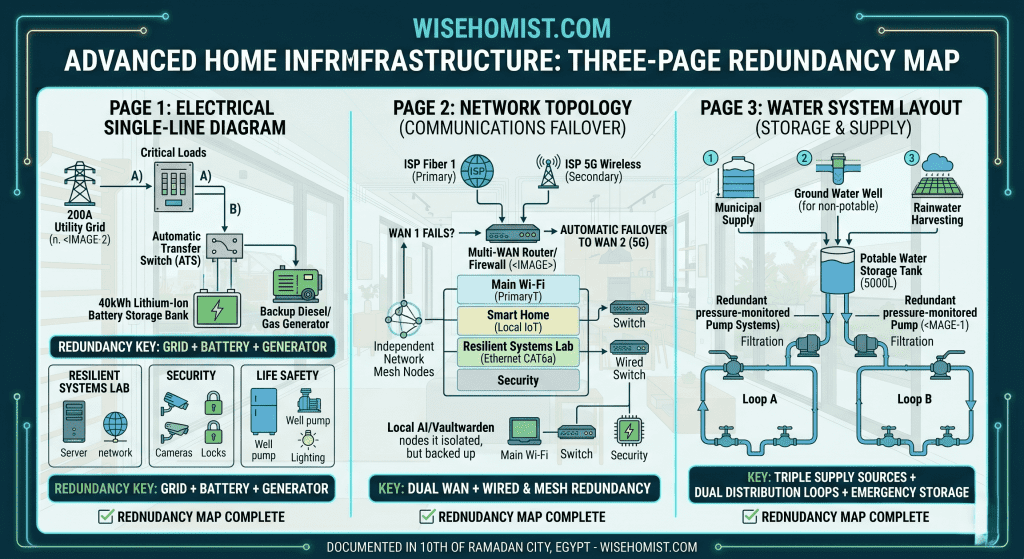
Create a “Redundancy Map” for your home—a single document showing every critical system, its primary source, and all backup layers. Mine is a 3-page Google Doc with: Page 1 Electrical Single-Line Diagram (Grid → Main panel → Inverter → Battery → Critical loads, Generator with transfer switch location, Circuit assignments for each load), Page 2 Network Topology (Fiber modem → Router → Switch → Access points, 4G backup path, Camera NVR location and storage capacity), Page 3 Water System (Municipal → Tank → Pump → House, Valve locations shutoff for each zone, Emergency water sources). Keep printed copies: One in electrical panel, One in kitchen (family reference), One in go-bag (evacuation reference). Digital copy: Encrypted USB drive, password in safety deposit box. This map has saved me hours during emergencies.
Advanced Home Infrastructure: The Integration: How These Three Systems Work Together
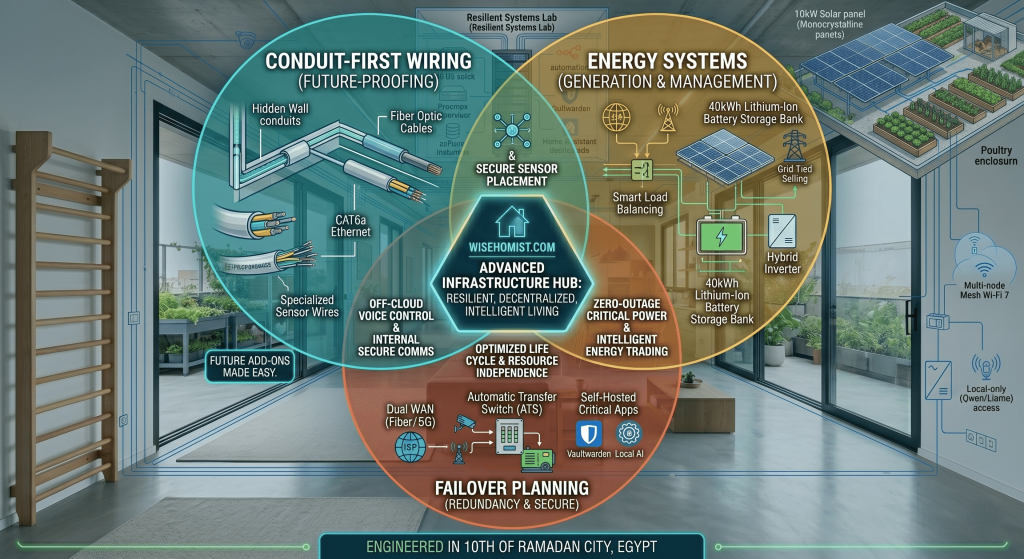
Conduit-first construction, energy management, and failover planning arent independent projects. Theyre layers of the same philosophy: build for resilience, plan for change, expect the unexpected. Conduits make future upgrades trivial. Energy systems reduce ongoing costs and grid dependence. Failover layers keep your home functioning when infrastructure fails. Together, they create a home thats: Adapts to technology that doesnt exist yet, Survives grid failures without panic, Thrives by generating its own power and managing it intelligently. In Egypts challenging infrastructure environment, this isnt luxury—its practical self-reliance.
Getting Started: Your First Infrastructure Upgrade
Dont try to retrofit everything at once. Pick one system. If Youre Building or Renovating: Week 1-2 Plan conduit runs (use the checklist above), Week 3-4 Install conduits before walls close, Month 2 Pull initial cables (data, low-voltage), Month 3+ Add devices as needed no wall-breaking. If Youre Existing Home: Week 1-2 Energy audit (install Shelly 3EM, track usage), Week 3-4 Identify biggest energy consumers, Month 2 Solar quote from 3 Egyptian installers, Month 3-6 Battery + solar installation. For Failover: Week 1 Create redundancy map (document what you have), Week 2 Test existing backups (do they actually work?), Month 2 Add one failover layer (internet or water first), Month 3 Add second layer (electrical backup).
The Bottom Line
Advanced home infrastructure isn’t about having the newest gadgets. Its about building a skeleton that supports your life reliably, efficiently, and resiliently. Conduits cost more upfront but pay for themselves many times over. Energy systems reduce bills and grid dependence. Failover planning turns disasters into inconveniences. In Egypt, where infrastructure can be unpredictable and upgrades are expensive, getting the skeleton right is the smartest investment you can make. Start with one system. Document everything. Test regularly. Your future self—especially the one dealing with a 36-hour summer blackout—will thank you.